Welcome back.
Your products
View allReleases
Have a code?
Get set up
- Quickest: press Download beside a product and drag the zip into Blender.
- With updates: make an access token under Keys, add our repository to Blender with it once, and install from Get Extensions. New versions then arrive there.
- Watch first: Installation and Setup (2:37) and the Complete Workflow (14:59).
Products
Everything we make, and what your account already has.
Keys
Blender installs and updates your products with an access token.
Your computers
AlphaHuman Studio runs on a computer you activated, for as long as it is on your account (a year at a time, at most). To activate or renew, press Activate in Blender (Preferences → Add-ons → AlphaHuman Studio) and confirm in the page it opens.
| Computer | System | Activated | Until |
|---|
Install in Blender, step by step
Once set up, Blender lists your products and tells you when an update is out. Prefer to watch? Installation and Setup (2:37) and the Complete Workflow (14:59) show every step.
A. Export a few MetaHumans from Unreal 5.8
- Make one folder for all your MetaHumans, for example
D:\MetaHumans. - In the MetaHuman Character editor: Create Full Rig, then Download Texture Sources; Assembly as UE Cine (Complete) with Bake Materials off; then Export → DCC Export into that folder. Each character gets its own folder with its DNA and textures. The manual, with pictures
- For hair and clothes, get AlphaHuman Studio for Unreal — free, on Fab (Epic Games Launcher: Fab Library → AlphaHuman Studio → Install to Engine, 5.8). Then Tools → AlphaHuman Studio → Export Grooms and Export Clothes, into the same folder. Its manual
B. Install in Blender 5.2
- Make an access token under Access tokens below and copy it — it is shown once.
- In Blender: Edit → Preferences → Get Extensions. If Blender asks, allow online access. Open the Repositories menu at the top right, press +, then Add Remote Repository, and fill it in as the picture shows:
- URL:
- Check for Updates on Startup: on, so new versions find you
- Requires Access Token: on, and paste your token into Secret
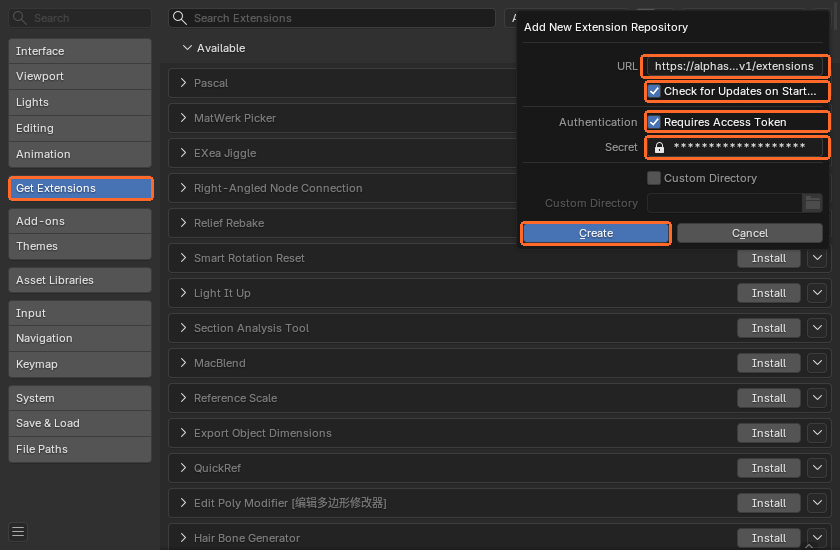
- Type AlphaHuman in the search box and press Install. If another AlphaHuman Studio is installed (the Superhive or a test build), uninstall it first under Add-ons.

- Add-ons → AlphaHuman Studio, open it with the arrow and press Activate. The browser opens this site; press Activate there too, and Blender picks the licence up by itself. The preferences show the day it runs out.
- In the same preferences, set MetaHuman Source Folder to the folder from part A. Then, in the 3D view, press N and open the AlphaHuman Studio tab: your characters are there to import.
No token? Press Download beside a product under Products and drag the zip into Blender instead — it just won't update itself.
Access tokens
One token per computer is easiest: if a machine is lost, revoke its token and the others keep working.
| Name | Token | Created | Last used |
|---|
Copy this token now. It is not shown again; if you lose it, revoke it and make another.
Team
Give each seat to the person who will use it. They sign in with that address, free, and the product is on their account; take a seat back and give it to someone else whenever you like.
Settings
Profile
Sign-in
Delete account
Deletes this account, its access tokens and the products on it. Products you bought cannot be restored afterwards.